Journal ·
How to track pack weight on a ruck with Apple Watch
Choose the pack or vest weight before you start, then record the walk on Apple Watch. Keeping the load in the same session as the distance and pace gives you a better basis for comparing two walks.
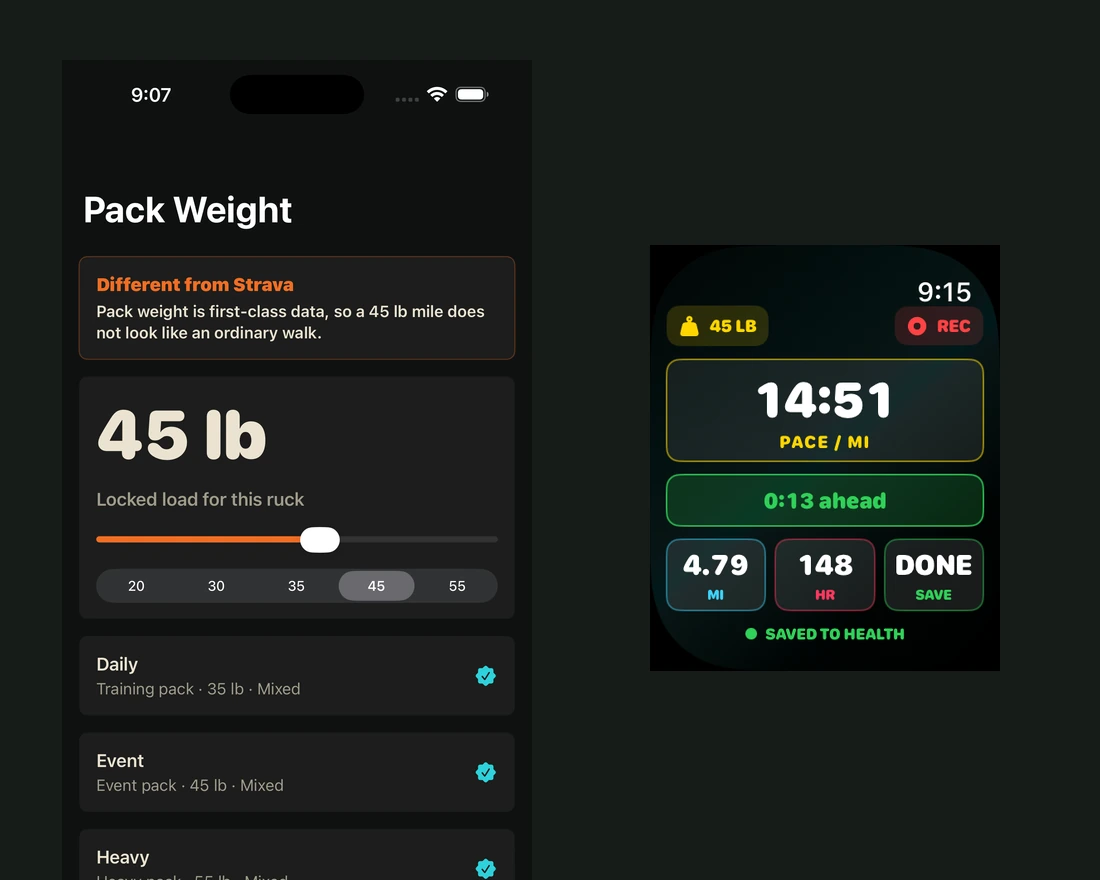
Set the load before you walk
Record the pack or vest weight you actually intend to carry. If you change equipment between workouts, use the same convention each time, such as recording the whole loaded pack. Consistent entries make later comparisons easier.
Record the walk on your wrist
Start the outdoor session on Apple Watch. Ruck Mode puts pace, distance and heart rate in the workout view alongside the load you entered. The iPhone setup and Watch workout are shown above using example screens.
Compare routes with the load in view
A 30-minute walk with a lighter pack and a 30-minute walk with a heavier pack are different sessions. When reviewing them, note the load and route first, then look at distance, pace and heart rate. Elevation, weather and terrain can also change the comparison.
Can I record a weighted walk without estimating calories?
Yes. Load, time, distance, pace and heart rate are useful records on their own. Track the values that help you understand the session and compare similar routes over time.
See the Below Zero Media app portfolio · Read more practical guides